WhatsApp us
Early access · founding schools welcome

Hi, how was their day?

Creche and preschool software for South Africa

HiDay emails every parent a daily report, sends monthly fee statements, runs re-registration and keeps your compliance records in order. A simple tap-to-log app for teachers and one clear screen for the owner.

  • Built around rand billing and EFT
  • Made with POPIA in mind
  • No app for parents to install
Report sent · 18 parents notified
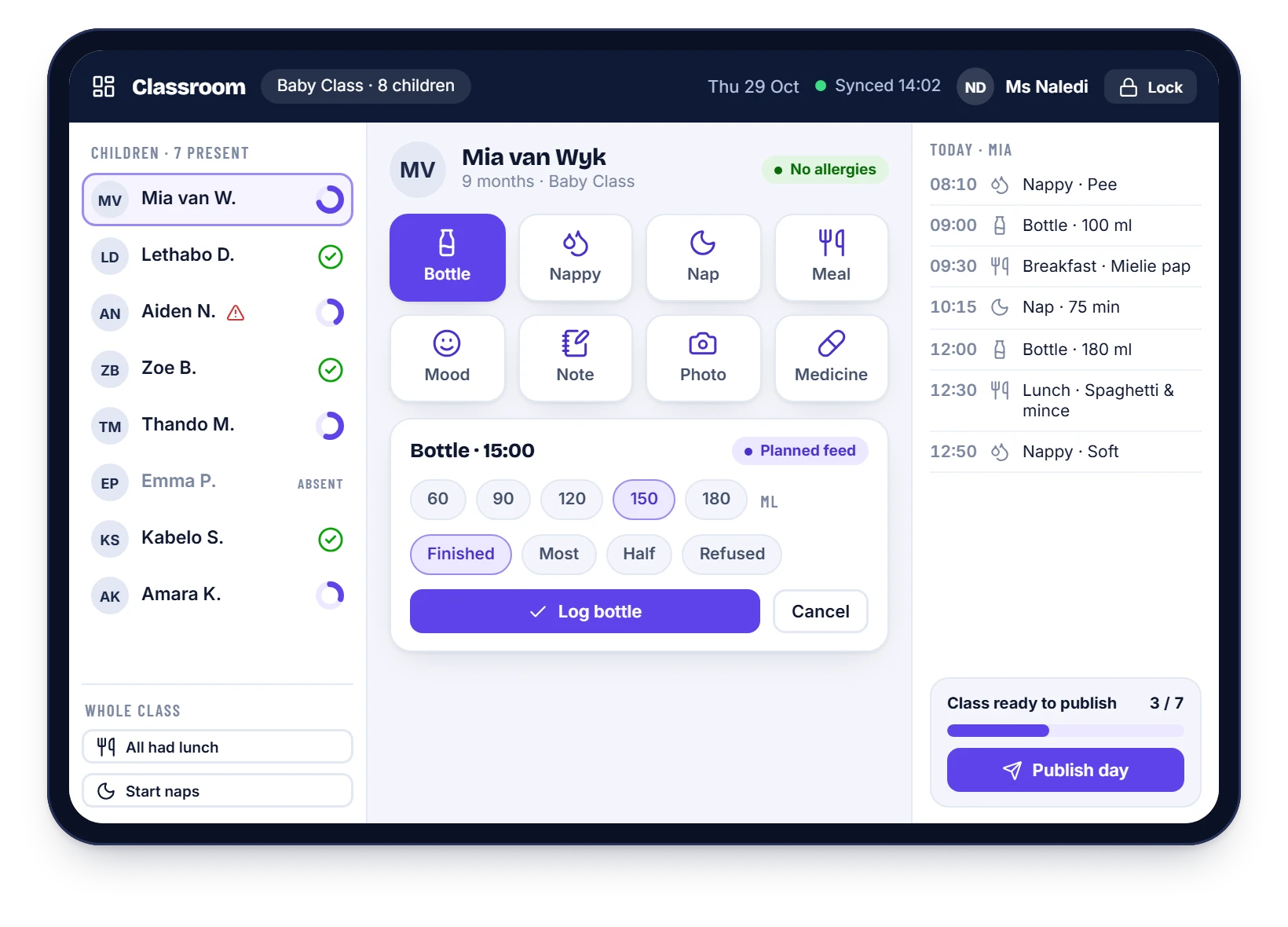
HiDay classroom screen on a tablet: a teacher logging a baby’s bottle feed with one tap
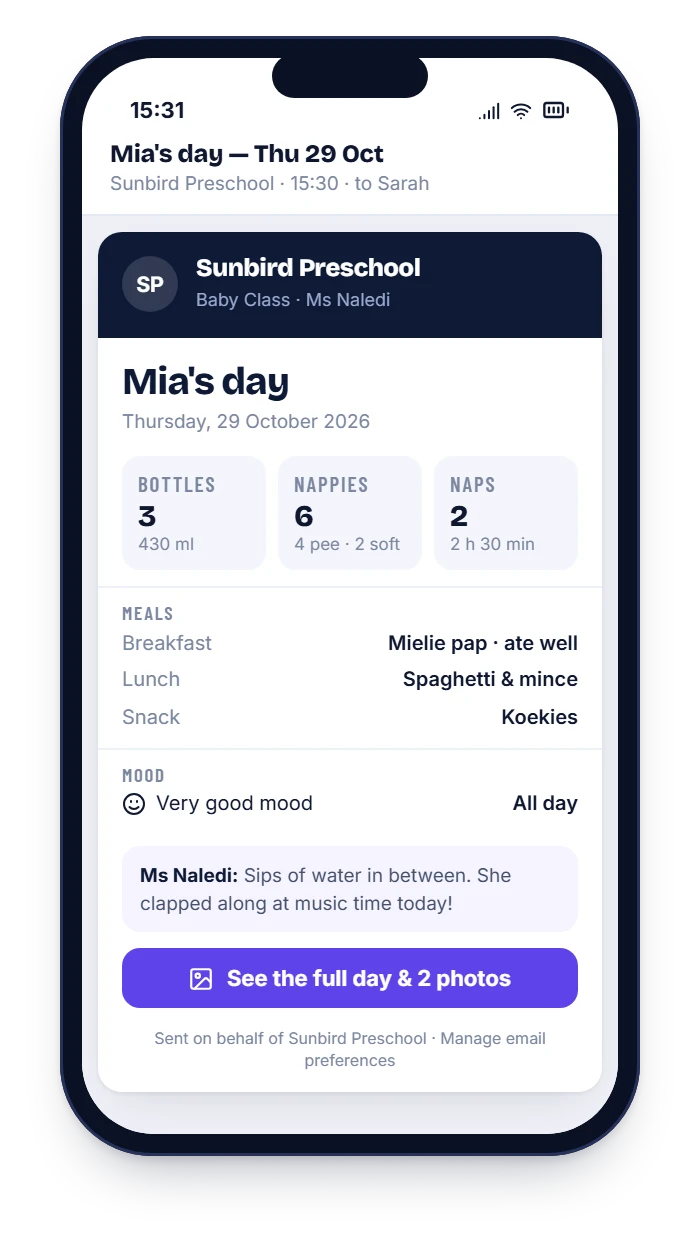
HiDay daily report email on a phone showing bottles, nappies, naps, meals and mood
Fees collected · 94%

Made for South African early learning

  • Creches
  • Preschools
  • Playschools
  • ECD centres
  • Grade R
  • Aftercare

From paper to inbox

The paper diary is lovely. It is also slow.

Teachers handwrite the same fields for every child, every day. Pages get lost in bags, parents see them late, and you only find out what was missed when someone complains. At month-end the statements are built by hand, and every October the re-registration forms need chasing.

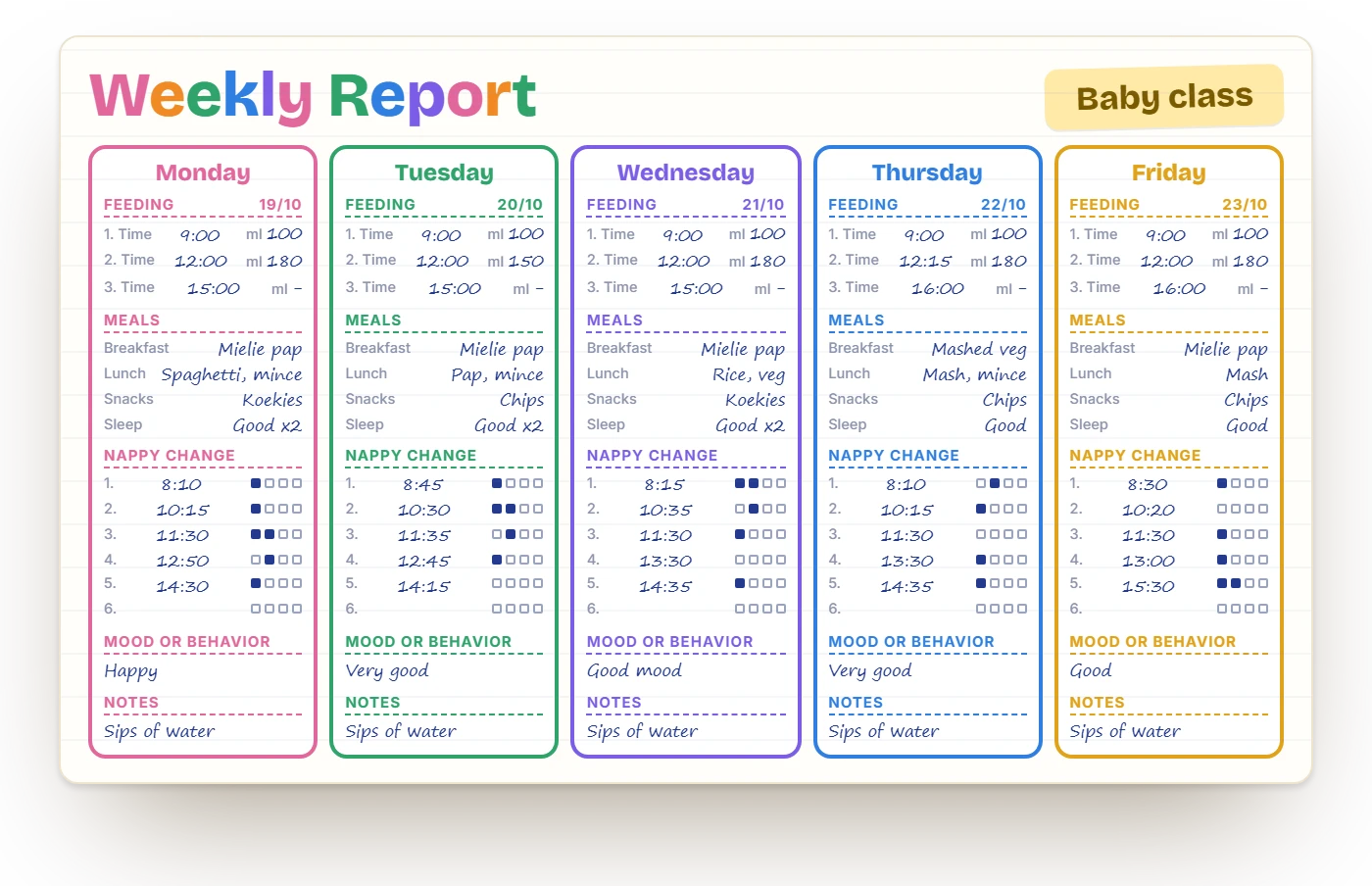
A handwritten weekly baby-class report book page with feeding, meals, sleep and nappy fields for each day
Before: the paper diary
The same day as a HiDay email on a phone: bottles, nappies, naps, meals, mood and a note from the teacher
After: the HiDay email
  • Teachers tap, parents read: no handwriting, no lost pages
  • Statements and re-registration run themselves
  • You see fees, seats and expiry dates in one place

For parents

Parents get the day, not just the bag

The report lands in their inbox at the time you choose, in the same order as the paper diary they know. A secure link opens the full day, the photos and the history.

  • Bottles, nappies, naps, meals, mood and a note from the teacher
  • Photos only for children whose parents have consented
  • A searchable history from the first day
  • Fees, forms and signatures from the same phone

How daily reports work

HiDay daily report email on a phone
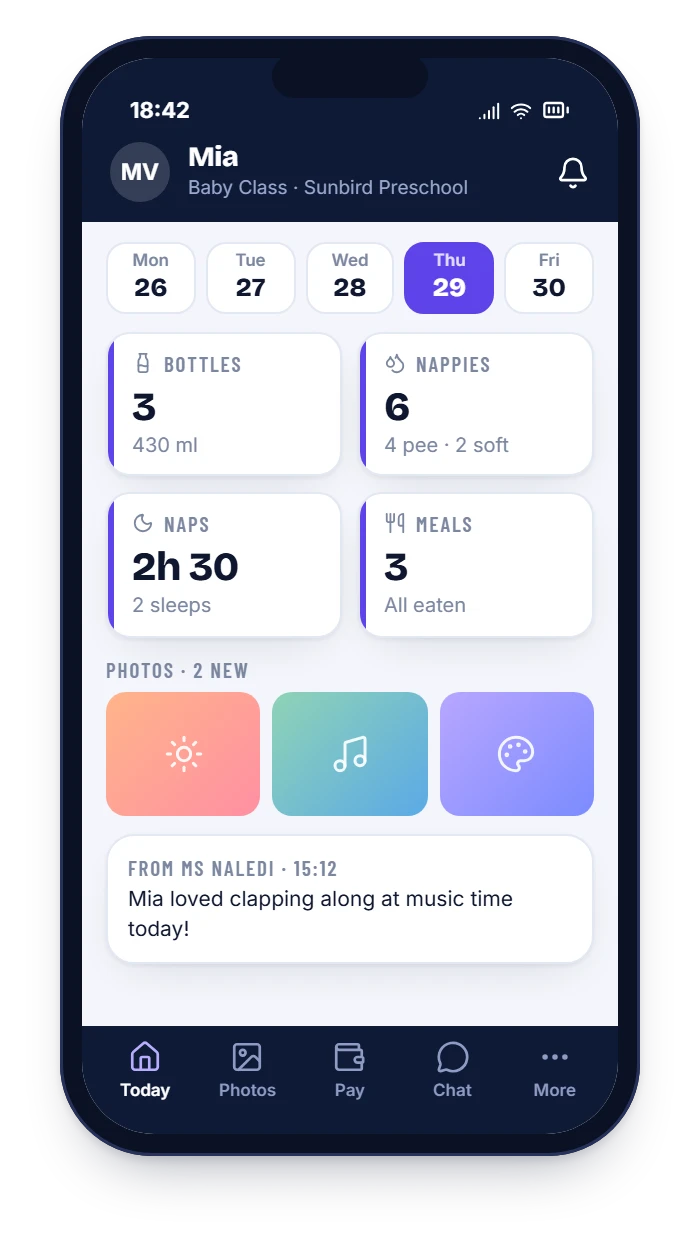
HiDay parent portal on a phone showing the day, photos and a message from the teacher

Fees and statements

Month-end without the scramble

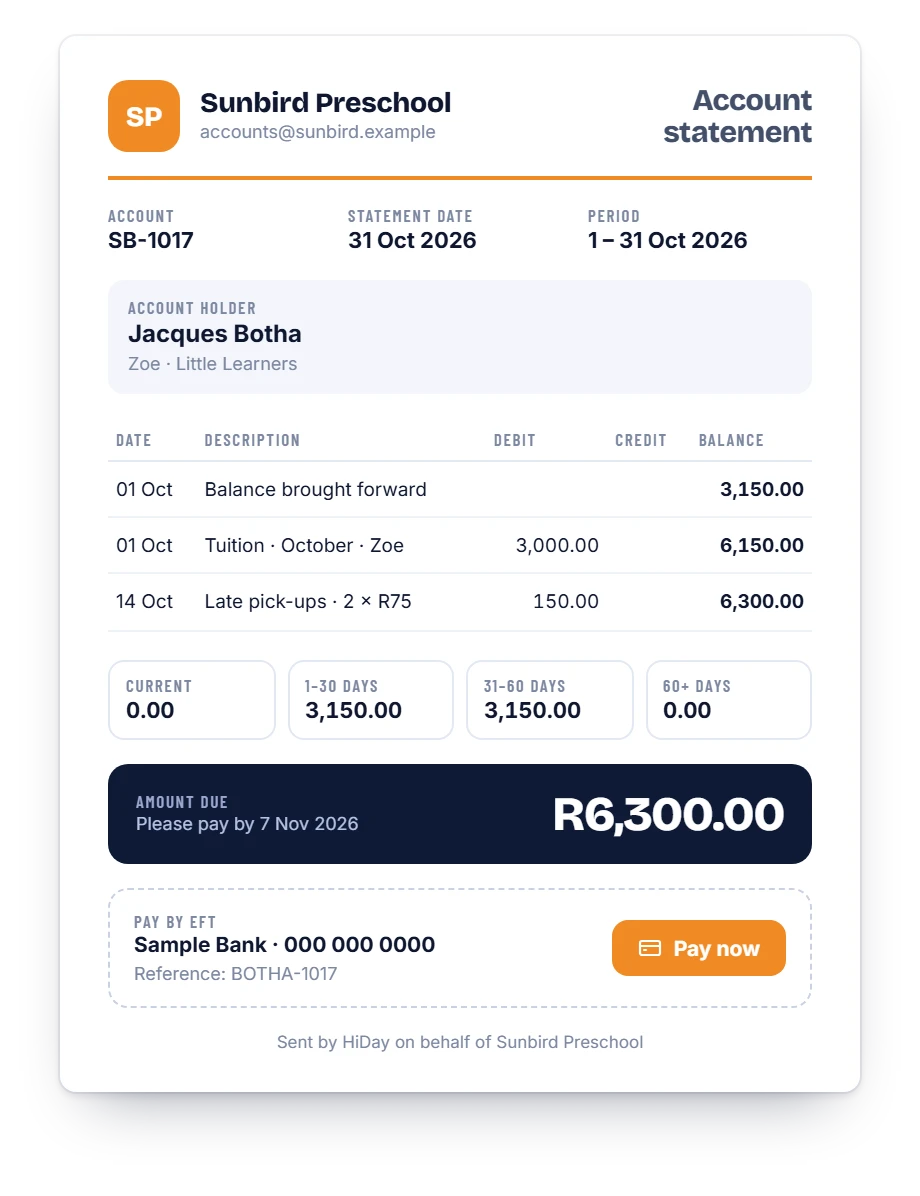
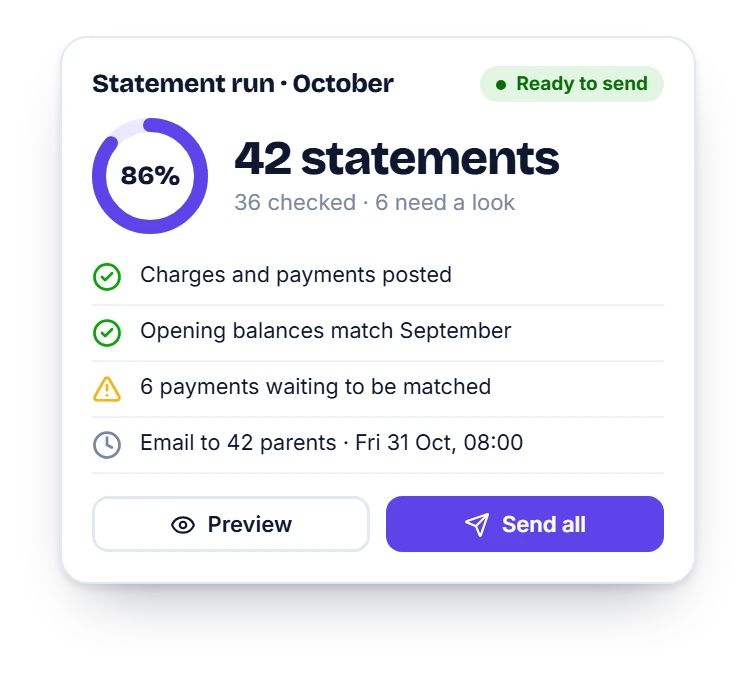
Run the statements once a month: preview, fix any exceptions, send. Every parent gets a clear PDF with the opening balance, charges, payments, ageing and a pay-now link.

  • One account per family, siblings together
  • Invoices on the 1st, reminders that send themselves
  • Late pick-up fees and extra days billed automatically
  • Card and instant EFT payment links

See fees and statements

A HiDay monthly account statement with opening balance, charges, ageing and a pay-now button
The HiDay statement run screen showing 42 statements ready to send

Re-registration

Re-registration, done on a phone

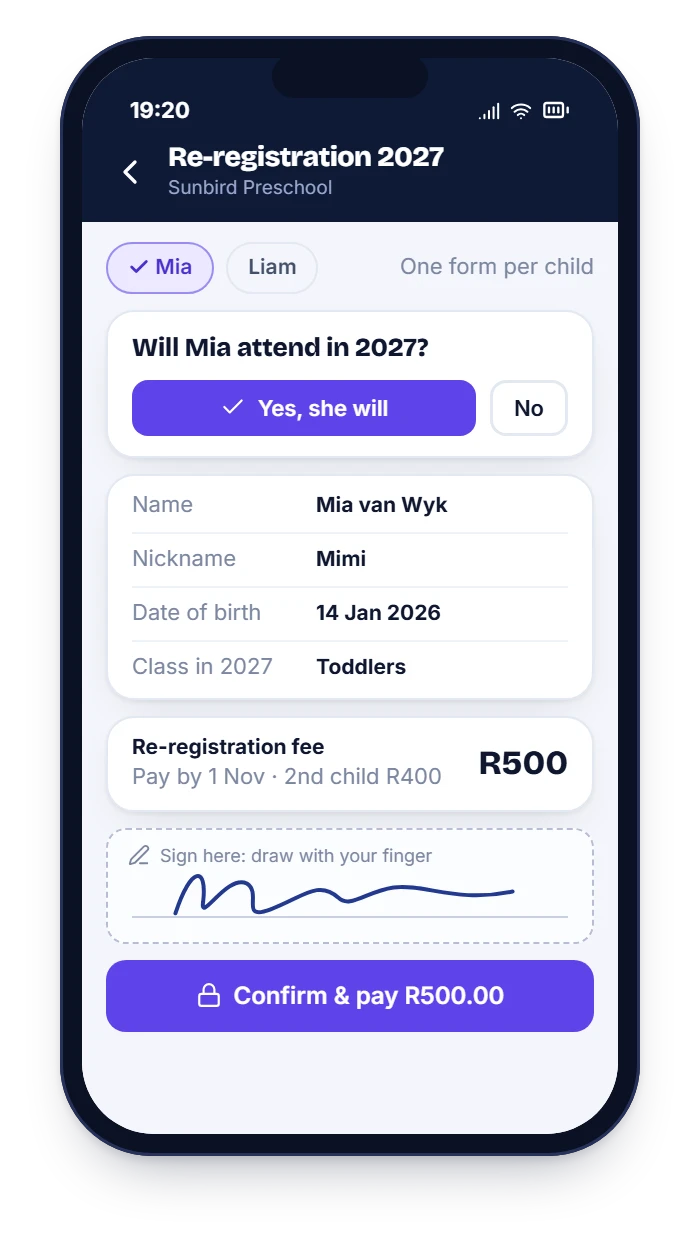
Parents get a pre-filled form for each child, say yes or no, pay the fee and sign with a finger. You see next year’s numbers while there is still time to fill the seats.

  • Fee by child order, deadlines and “confirmed when paid”
  • Reminders for every parent who has not replied
  • Returning, leaving and open seats, by class

See re-registration Free template

HiDay re-registration dashboard showing returning, leaving and no-reply counts and seats for next year
HiDay re-registration form on a phone with attend or not attend choice and signature box

For owners

See your whole school at a glance

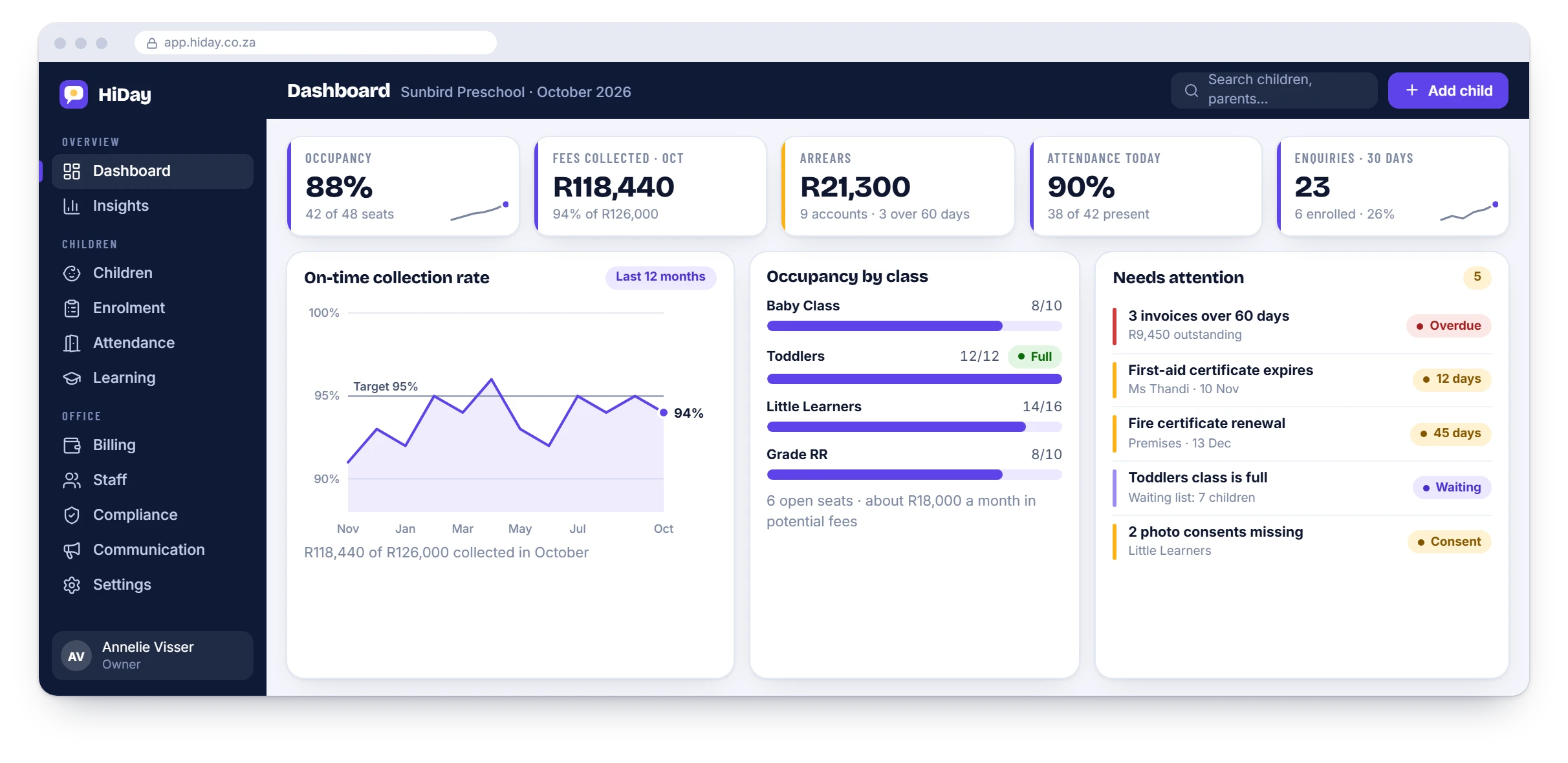
Occupancy, fees collected, arrears, enquiries and anything that needs attention, from certificates about to expire to a class that is full. Decide with real numbers.

HiDay owner dashboard with occupancy, fees collected, arrears, attendance, enquiries, a collection-rate chart and a needs-attention list

Children’s information

Built with POPIA in mind

A preschool holds some of the most sensitive information there is. HiDay is designed around that from the start.

  • Teachers see their own class and nothing else
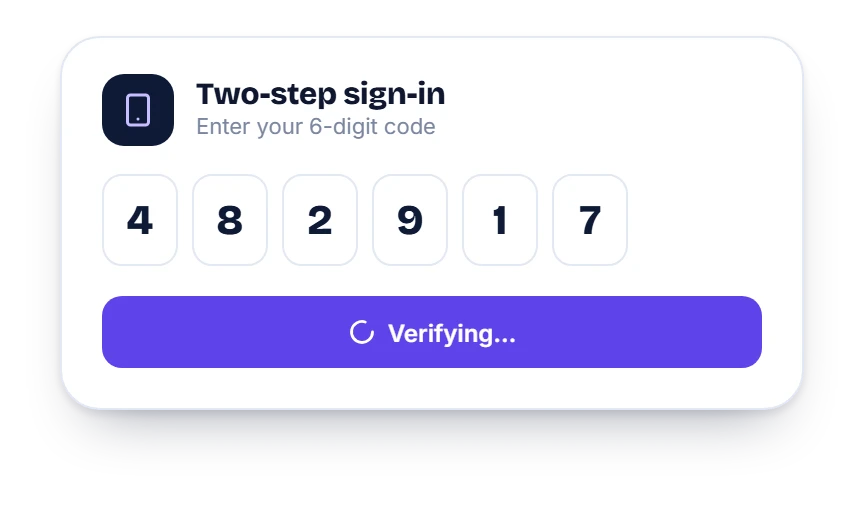
  • Two-step sign-in for staff
  • A full audit trail of who viewed or changed what
  • Parent consent for information and photos, recorded per child
  • Your school stays the responsible party; we act as your operator under a written agreement

Compliance and POPIA

HiDay two-step sign-in screen asking for a six-digit code

How it works

From first message to first report

  1. 1

    Tell us about your school

    WhatsApp us your classes, age groups and how you run fees today. We will walk you through HiDay with your own set-up.

  2. 2

    We set it up with you

    Classes, report templates, parents and your fee structure go in. Teachers get a short, hands-on session.

  3. 3

    Start with one class

    Run HiDay beside the paper diary for a week or two. When it feels right, switch the rest of the school over.

Plans

Two plans, quoted for your school

Start with daily reports and move to the full suite when you are ready. We quote each school, so WhatsApp us and tell us about yours.

Daily Reports

Replace the paper diary.

Enquire for pricingQuoted for your school

  • Classroom app for teachers, on tablet or phone
  • Report templates per age group
  • Parent email at the time you choose
  • Parent portal with the full history
  • Photo sharing with consent records
  • Child and family profiles
  • Locked-down teacher access
  • Onboarding and staff training

Upgrade to the Full Suite at any time. Your data carries over.

Whole school

Full Suite

Run the whole preschool.

Enquire for pricingQuoted for your school

  • Everything in Daily Reports, plus:
  • Enrolment, waiting list and yearly re-registration
  • Fees, invoices, monthly statements and online payments
  • Attendance, QR check-in and verified collectors
  • Staff, leave, rosters and ratios
  • Compliance registers and expiry reminders
  • Announcements, events and messaging
  • Learning plans, milestones and term reports
  • Meals and menus
  • Owner insights dashboard

How pricing works

Questions

Frequently asked questions

What is HiDay?

HiDay is software for South African creches, preschools and ECD centres. Teachers log the day by tapping on a tablet or phone, parents get a daily report by email, and the owner gets fee statements, re-registration, compliance records and a dashboard in the same system.

Do parents need to install an app?

No. The daily report arrives as an email, and a secure link opens the full day and the photos in the phone’s browser. Parents can add the portal to their home screen if they like.

Does it work when the Wi-Fi drops?

Yes. Teachers keep logging on the tablet, entries are saved on the device, and they sync automatically when the connection returns.

Can HiDay send monthly fee statements?

Yes. HiDay keeps one account per family, runs your invoices and emails each parent a PDF statement with the opening balance, charges, payments, ageing and your banking reference. See how statements work.

How does re-registration work?

You open a campaign and parents receive a pre-filled form for each child. They confirm whether the child is coming back, pay the re-registration fee and sign with a finger. You see who has replied, who is leaving and how many seats are open next year. See the re-registration flow.

Is children’s information protected?

HiDay is built with POPIA in mind: teachers only see their own class, staff sign in with two-step verification, every change is logged, and parent consent for information and photos is recorded per child. This is general information, not legal advice. Read more.

Which schools is HiDay for?

Creches, preschools, playschools, ECD centres, Grade R classes and aftercare programmes, from small centres to schools with several classes.

How much does it cost?

We quote each school, so please enquire. WhatsApp us on 084 297 9476 or email hi@hiday.co.za with the number of classes and children you have and the plan you are interested in, and we will come back with a price. See the pricing page.

Can we run HiDay next to the paper diary at first?

Yes, and we suggest it. Start with one class, run HiDay alongside the paper diary for a week or two, then switch everyone over.

See HiDay with your own class

WhatsApp us and we will walk you through a daily report, a statement and a re-registration form, set up the way your school works.

WhatsApp us